Enhancing User Reports Experience
This UX case study revolves around improving the reporting function in Divar, Iran's largest marketplace app, to reduce scams and unwanted messages within the chat feature. After comprehensive user research and analysis, it was found that over half of the users weren't aware of the reporting function. To address this, new features were implemented, such as an onboarding screen for new users, a prompt to report suspicious activity upon taking a screenshot, and making the reporting flow more visible in the app. As a result of these changes, there was a 10% increase in total reports, a 30% decrease in false reports, and 89% awareness of the reporting feature.

About Divar
Divar is the biggest and most used Iranian marketplace with a Classified-ads Business model. Divar is a popular destination for people looking to buy, sell, or trade items with others. It is categorized into six different sections – Real Estate, Jobs, Goods, Services, Tools, and Others – which makes it easy for users to find the items they are looking for.
Divar is an excellent choice for those who want to find a wide variety of items in one convenient location. Additionally, Divar's user-friendly interface makes it easy to browse and search for items, making it a great option for those who are less experienced with online classified-ads. With its vast selection of items, Divar is the perfect choice for anyone looking for a reliable online marketplace.
Summary
Our research found that over half of the users were not aware of the reporting function and how to report suspicious activity within Divar chat. We analyzed the current design and identified assumptions, including users' lack of awareness and users not seeing or focusing on the reporting CTA.
To address this, I added an onboarding screen for new users and prompt users to report suspicious activity upon taking a screenshot in chat. By improving the reporting flow and making it more visible to users, I was able to increase the number of legitimate user reports to reduce scams, disturbances, and spam messages on Divar's chat feature.
+10%
Total Submitted Reports
-30%
False User Reports
89%
Awareness (Report Feature)
Objective
We aimed to reduce scams, disturbances, and spam messages sent inside Divar’s chat feature.
Chatting on Divar
When you activate the chat feature, you open up a whole new level of communication. Instead of relying on phone calls or emails, you can send and receive instant messages in real-time. Whether you're negotiating a price or arranging a meeting, the chat system makes it easy to stay connected with other users.
However, with any chat system comes the potential for unwanted messages or even harassment. That's why one of the critical features of any chat-based product is a proper block/reporting feature. At Divar, we take user safety seriously, which is why we developed our block/reporting system about 1 year ago.
Our block/reporting system allows you to block other users who may be sending unwanted messages or behaving inappropriately. This not only keeps you safe, but it also ensures that the platform remains a friendly and respectful space for all users. Additionally, you can report any suspicious or inappropriate behavior to our support team, who will investigate the issue and take appropriate action.
Further research
We conducted research on a subset of our user base who have experienced a scam, disturbance, or fraudulent activity on Divar. Firstly, we conducted a quantitative user interview to gain insights into user perspectives, belief systems, and the impact of ethnicity on our product. This round of interviews provided us with valuable feedback and data that we could use to improve our platform. Next, we conducted a survey on our user subset to quantify our findings. The results of our research were concerning:
💡
52% of our users were not aware that Divar had a reporting function or how to report suspicious activity within the chat.
After dedicating time and resources to this research, we were able to identify a major knowledge gap in our user base regarding our reporting function. To address this issue, we should try and find out the reason that caused that.
Reporting flow (before redesign)
Prior to this design task, We didn’t inform users that they could report inside the chat. The reporting feature is hidden inside the hamburger menu, and there are no other ways to access it.
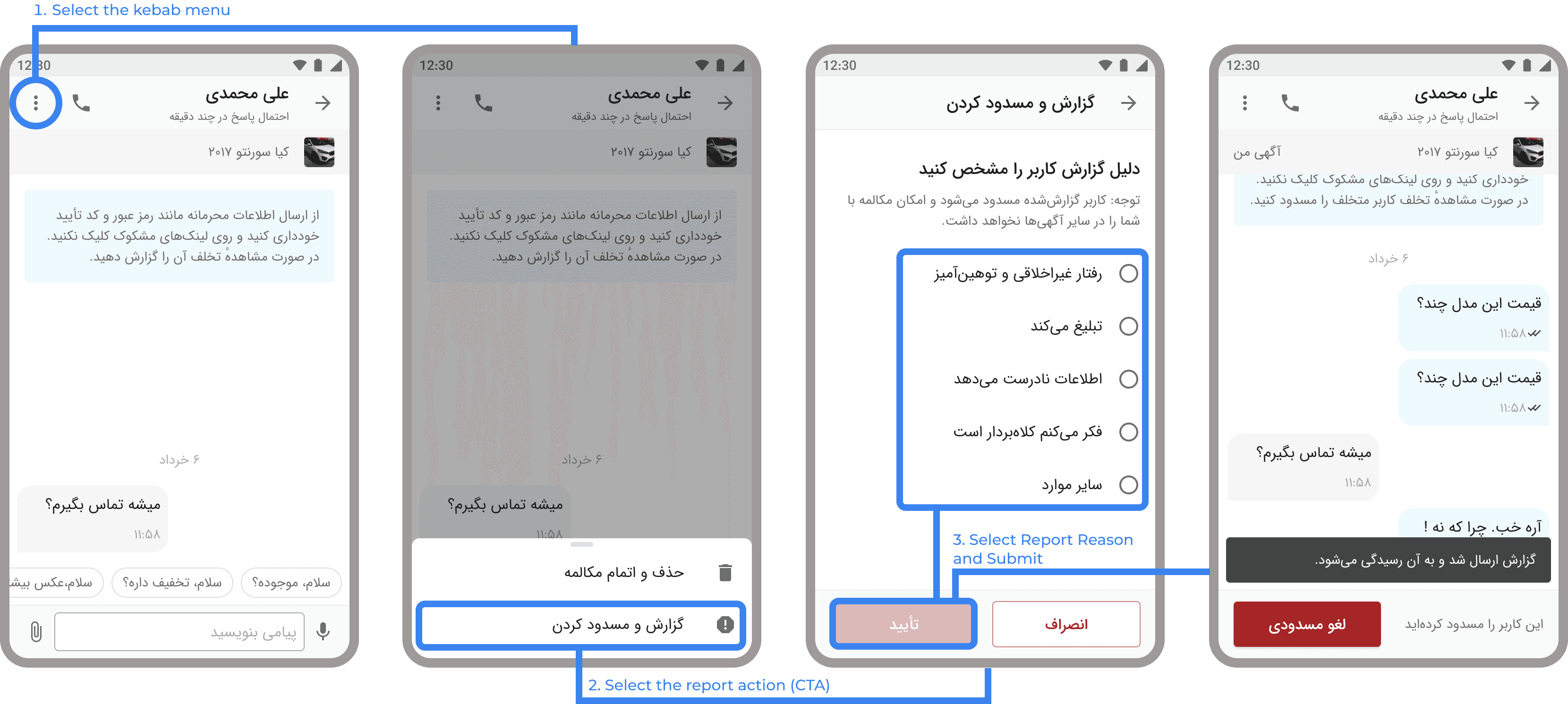
Our assumptions
After careful consideration of all aspects of old design, I reached a set of assumptions that can cause this problem:
Users don’t regularly check the content hamburger menu, So they don’t know there is any reporting function in chat. We can narrow our data and analyze clicking on the kebab menu action log to find this.
Users open the kebab menu but don’t see or focus on the reporting CTA. Checking the kebab menu action log will show us if this problem exists or not.
The ethnicity and background of our users don’t make them report things. They try to ignore the spam messages or don’t answer scam chat, But they don’t use to report them. So here, there is no findability issue, and we can make sure there is no usability issue by conducting a qualitative usability test.
Design Changes
Chat feature changes
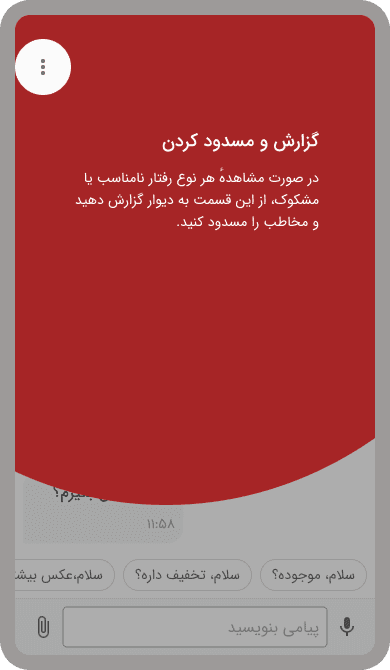
Onboarding
Upon opening chat for the first time
We have added an onboarding for new users. This onboarding will show to every user while they open the chat feature for the first time.
Using onboarding isn’t the most efficient way to fix this problem. They interrupt users and don’t let them do what they want to, so they try to skip reading them as soon as possible, and having an onboarding doesn’t help users.
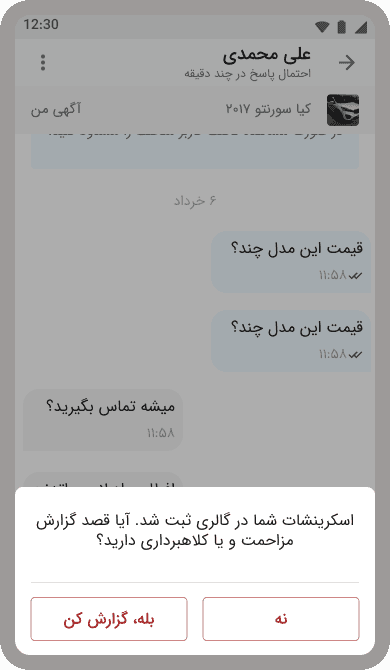
Prompt user to Report
Upon taking an screenshot in a chat
In our observation, a huge segment of users takes screenshots while countering a problem or issue in chat.
Upon taking a screenshot, We show a bottom sheet saying that your screenshot has been successfully saved on your gallery, and ask them if there is any problem; they can report the chat by using a CTA shortcut on the bottom sheet or dismiss the prompt.
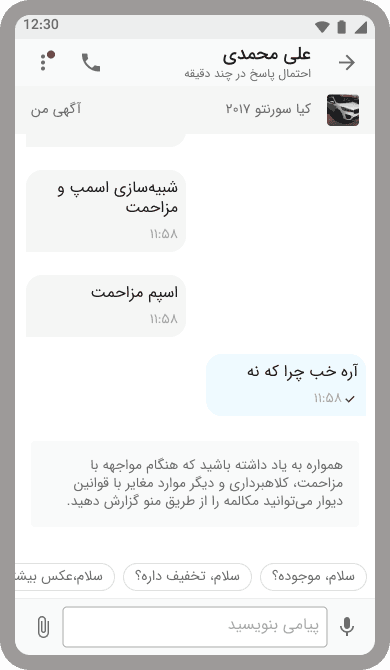
Inline Hint
While a suspicious pattern detected
Another way that we can inform users that they can report others is directly in the chat itself. When we detect inappropriate behavior or use of suspicious patterns or wordings, We show a prompt that reminds users that they can report this chat and add an indicator beside the kebab menu button to attract user’s attention.
Introducing the new profile
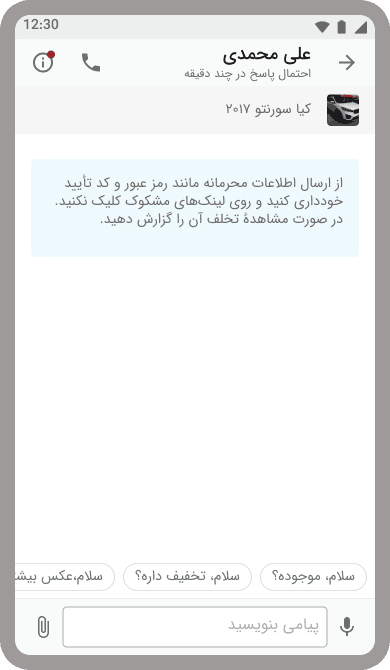
New icon
Based on usability
Instead of using the kebab menu, use an Info icon that may increase usage of this button instead of a regular hamburger menu.
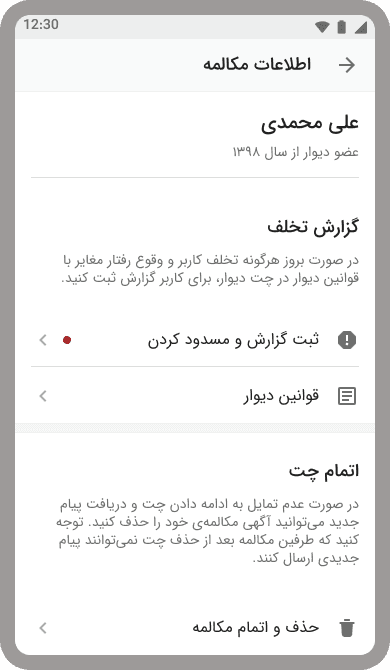
Better UX
Writing enhancement
We also Added information and description for each function so users can have a better chance of seeing and focusing on reporting or deleting the chat functions and what each can do.
As a bonus, we show our terms and chatting rules next to report CTA, So users have a way to know what kind of behaviors they can submit their report.
Prompt user
Based on AI
Another way that we can inform users that they can report others is directly in the chat itself. When we detect inappropriate behavior or use of suspicious patterns or wordings, We show a prompt that reminds users that they can report this chat and add an indicator beside the kebab menu button to attract user’s attention.
Results
Our research found that over half of the users were not aware of the reporting function and how to report suspicious activity within Divar chat. We analyzed the current design and identified assumptions, including users' lack of awareness and users not seeing or focusing on the reporting CTA. To address this, I added an onboarding screen for new users and prompt users to report suspicious activity upon taking a screenshot in chat. By improving the reporting flow and making it more visible to users, I was able to increase the number of legitimate user reports to reduce scams, disturbances, and spam messages on Divar's chat feature.